
Greg Ekborg
Marketing Director, systech
Small Business Cyber Attacks Almost Always End at the Same Screen
Security · Southwest Oregon
Almost every attack on a small business ends at the same screen
The phone call, the fake Wi-Fi network, the email that looks like Microsoft. They all funnel into one moment. Understanding that moment is worth more than memorizing any list of warning signs.
systech · Roseburg and Coos Bay, Oregon · August 2026
An accounting manager's inbox starts filling at 9:15 on a Tuesday. Not a few messages. Hundreds, arriving faster than she can delete them. Work stops.
Four minutes later a Microsoft Teams message arrives from someone identifying themselves as IT support. They have noticed the spam problem. They can fix it. There is a small patch to run.
Nothing in that sequence looks like an attack. Nobody clicked something obviously stupid. Somebody accepted help at the exact moment they badly wanted help, and that is the entire technique. The flood was manufactured to create the problem the fake helpdesk arrived to solve.
This particular pattern has a tracked threat group behind it, but the group matters less than the shape, because the shape repeats everywhere.
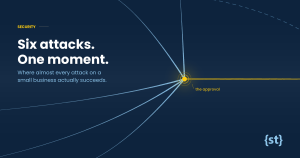
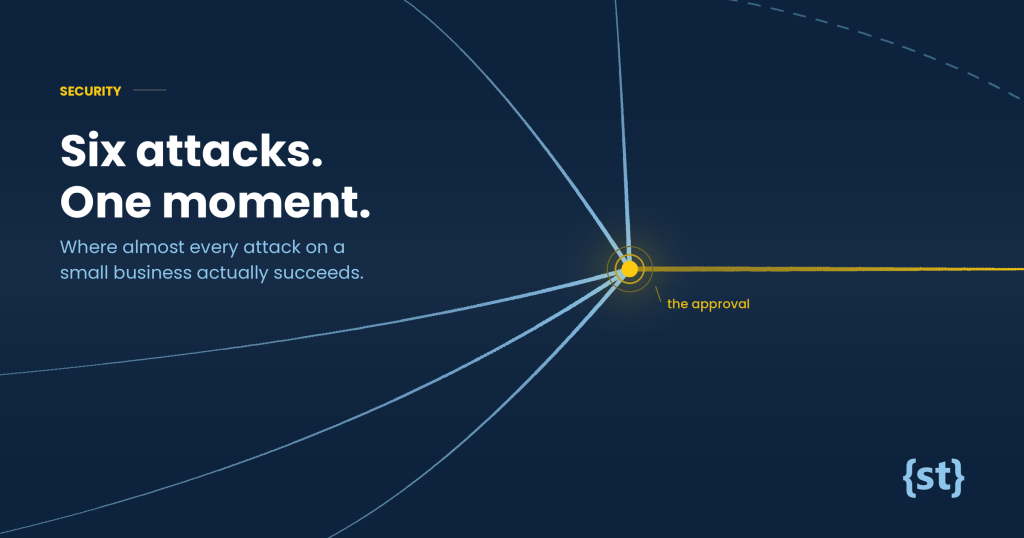
Six attacks, one moment
Below are tactics that have actually been landing on small and mid-sized businesses this year. On the surface they have nothing in common. A phone call. A hotel network. A signed Apple installer. Sort them by where they end up and something obvious appears.
Where each attack actually succeeds
Six tactics currently in circulation, sorted by the step that decides whether they work.
The AI voice call
A cloned voice asks you to read back a code.
MFA fatigue
Push notifications repeat until you tap Approve to make them stop.
Hijacked public Wi-Fi
A convincing login page collects whatever you type into it.
The fake helpdesk rescue
You are talked into installing the fix yourself.
Phishing email
The Verify button leads to a page that wants your password.
Credential-stealing malware
The exception. It takes saved logins directly instead of asking.
Five of six succeed only if a person approves, types, or reads back a credential.
The moment, named
Strip away the delivery method and every one of these is the same request. Someone needs you to hand over proof that you are you. A password. A six digit code. A tap on a notification.
That request is the attack. Everything else is staging. The spoofed caller ID, the manufactured inbox flood, the hotel network, the Apple-signed installer: all of it exists to make the request feel routine enough that you answer without pausing. Which is not a high bar, because you answer that exact request legitimately several times a week.
Attackers do not need to break anything. They need you to complete a task you complete every day.
This reframes what defense actually means. Antivirus does not help much here, because there is often no file to scan. A firewall does not help, because nothing is being forced. What helps is a habit: notice the moment, pause, and verify through a channel the message did not hand you.
That last part carries most of the weight. A Teams message gets verified by phone. An email gets verified using a number you looked up yourself, never the one printed in the email. Attackers control the channel they contacted you on. They do not control the second one.
Why this is about to change
Microsoft has reached the same conclusion and is acting on it.
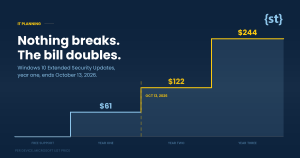
From September 1, 2026, passkeys become the default sign-in method in Microsoft 365 and Entra ID. Anyone still signing in with a texted or called-in code will be prompted to set one up. From February 1, 2027, Microsoft stops delivering those codes entirely, with no opt-out, covering password resets as well as sign-ins.
The logic maps precisely onto the chart above. A six digit code is a secret you can be talked out of. It can be read aloud to a stranger, intercepted on its way to your phone, or typed into a page that looks exactly like Microsoft and is not. A passkey cannot. It lives on your device and unlocks with a fingerprint, a face, or a PIN. There is nothing to hand over even if someone convinces you to try.
Read the convergence chart one more time with that in mind. Passkeys do not make people harder to fool. They remove the thing a fooled person is able to give away.
The timeline
What a sensible plan looks like
This is a scheduling problem, not an emergency. Four things separate the businesses that handle it quietly from the ones that spend January on the phone with support.
- Find out who is still on text codes. Microsoft provides an administrator report for exactly this. That list is your to-do list, and it is usually shorter than people expect.
- Move people in small groups. A phased rollout with a plain-English heads-up beats a company-wide surprise on a Monday morning. Rushed rollouts are what generate the help desk pile-up.
- Catch the accounts nobody thinks about. The front desk login, the shared accounting mailbox, the owner's account that only signs in from home. These are the ones that hit the February wall.
- Keep training the habit anyway. Passkeys close the credential handoff. They do not stop a fake invoice, a vendor impersonation, or a gift card request from someone posing as your boss. The pause is still the thing.
Worth knowing: moving to passkeys costs nothing. The paid workaround exists for organizations with a real regulatory requirement, and for most small businesses it is an unnecessary line item.
The part that will not change
Passkeys are a genuine improvement and worth doing early. They are not the end of the story. Attackers will keep working the same seam, because the seam is not a technology. It is the small social pressure of being asked for something reasonable by someone who sounds like they belong.
Which is why the rule we give every client stays exactly as it is. A real IT provider will never ask you to install software from a chat message, never reset your password through a message you did not request, and never send you a password expiration warning by email. If something does any of those, it is not them, whoever's name is on it.
And nobody at a decent helpdesk has ever been annoyed by a false alarm. Checking costs a minute. Not checking is the other story.
Not sure where your business stands?
Tell us roughly what you are running and we will tell you plainly which of these dates apply to you, which do not, and what a realistic plan looks like between now and October. If the answer is that you are already fine, we will say so.
Prefer to talk? Email support@systech.io or call 541.696.5555, Option 1.
Go deeper on any of these
We publish short alerts on each of these tactics as they surface. All plain English, all built to forward around an office.
Even if the call sounds real, it might still be a scam →
AI now copies a human voice well enough that a robotic tone is no longer the tell.
One push notification is normal. Several in a row is the attack.
Five rules for hotel and airport networks, for anyone who travels for work.
Six moments worth a ten second pause, with a printable one-page desk guide.
Even if the email looks real, it might still be a scam →
A fake Microsoft security notice taken apart line by line.
That "Crash Reporter" prompt might not be Apple →
The exception in the chart above. Signed by Apple's own process, and still malware.