


Security alert · Microsoft 365
Device code phishing: how a “confidential document” email tries to take over your Microsoft 365 account
This was not a subtle attack. It took five separate steps, and every one of them should have raised a flag.
The bottom line
Never type a code into a Microsoft page unless you started the sign-in yourself on a device you are holding.
If a document, email or website gives you a code to enter, stop and call systech.
Summary
A phishing email reached one of our users this week that was built to steal access to their Microsoft 365 account without ever asking for a password. The attack is called device code phishing. It was reported to systech, and we are sharing it so everyone can recognize it.
The email carried a password-protected PDF, which led through a fake OneDrive link, a fake “I am human” check and a fake OneNote page to Microsoft's real sign-in page. There, the victim is asked to type in a code. That code belongs to the attacker. Entering it hands the attacker a working sign-in to your account that keeps working even after you change your password.
The rest of this alert walks through each step so you know exactly what to look for.
How the attack worked
The attacker needed the victim to clear five hurdles. Every one of them was a chance to stop.
An email with a PIN-locked PDF
The email claimed “You have received a confidential document” and attached a PDF that needed a PIN to open. The PIN was supplied in the email itself.
Red flags
- A locked attachment from someone you were not expecting. Attackers lock files so email security scanners cannot look inside them.
- A PIN that arrives in the same email as the file protects nothing. Its only purpose is to get past our filters.
A fake OneDrive link inside the PDF
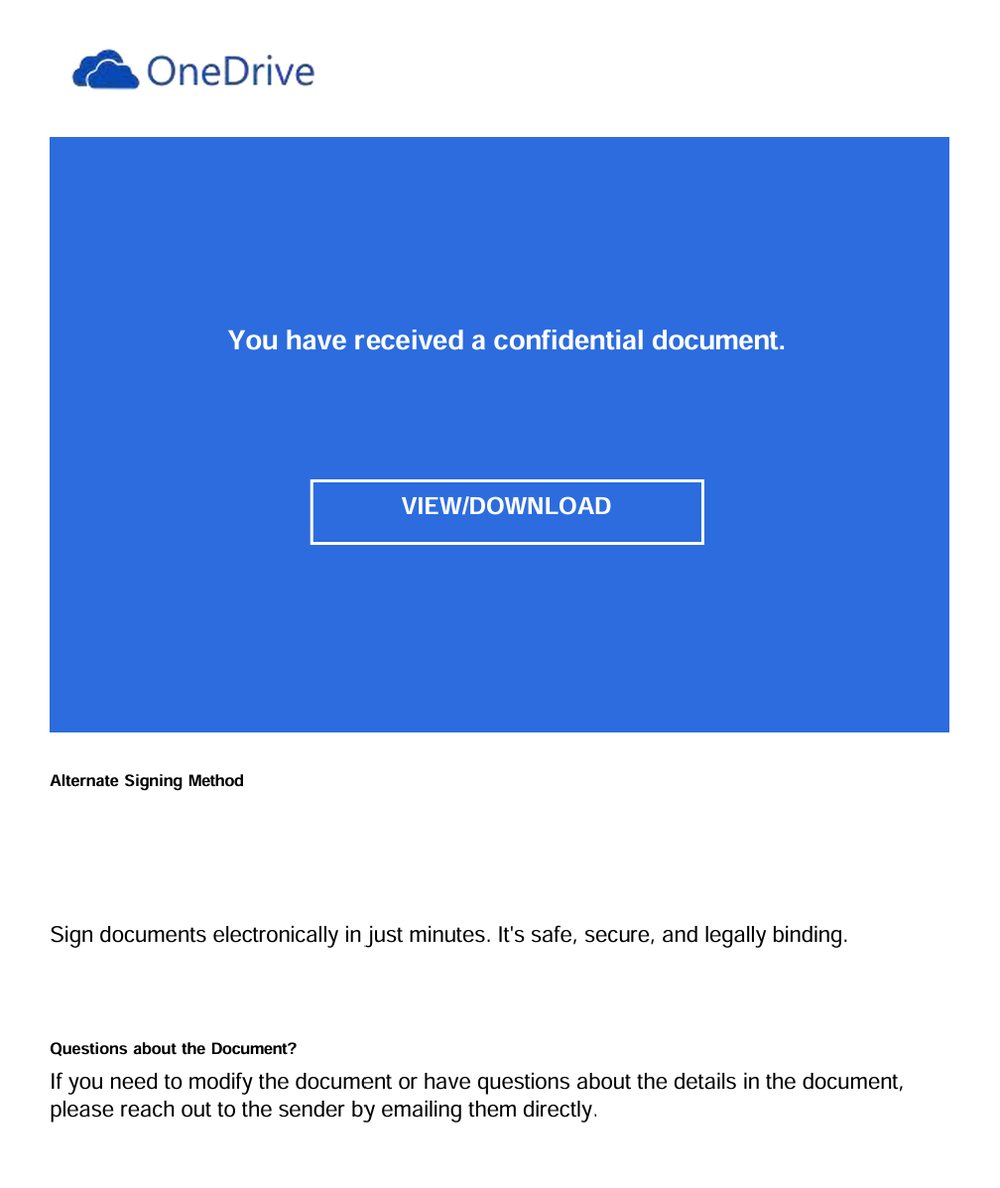
Inside the PDF was a OneDrive-branded page with a VIEW/DOWNLOAD button. The link did not go to OneDrive or anywhere at Microsoft.
Red flags
- Mixed branding. It shows a OneDrive logo, then talks about an “Alternate Signing Method” and signing documents electronically, which is DocuSign language.
- Links hidden inside a locked PDF are a common way to sneak past email link scanning.
A fake “Security Verification” check
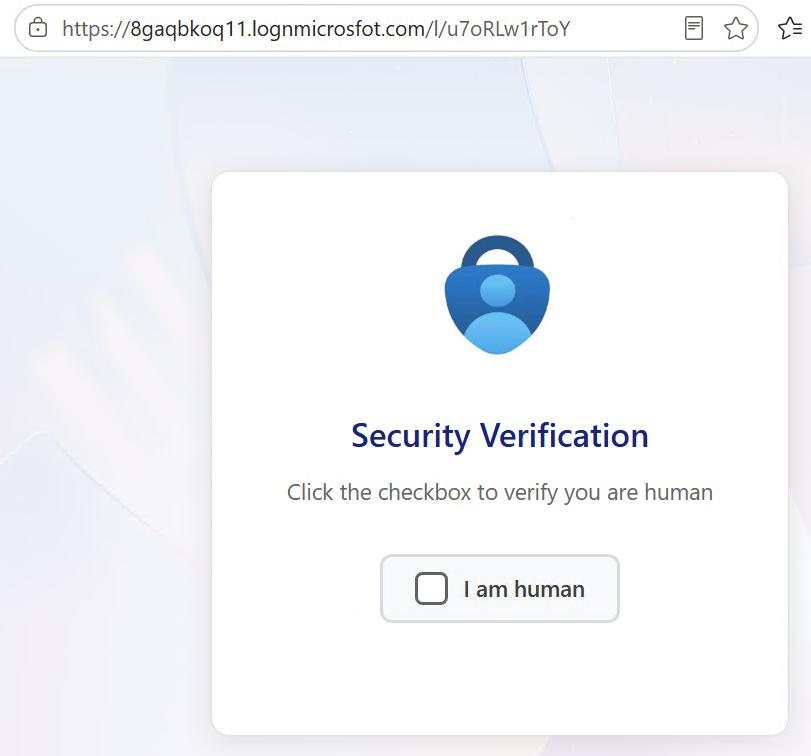
Clicking the link opened a page with a Microsoft Authenticator-style logo and an “I am human” checkbox, designed to look like a routine security step.
Red flags
- The web address was 8gaqbkoq11.lognmicrosofot.com. That is not Microsoft. Read it slowly: logn and microsofot are misspellings meant to look right at a glance.
- Fake CAPTCHA checks exist to block automated security tools and to make the page feel official. Real shared documents do not ask you to prove you are human.
A fake OneNote page that hands you a code
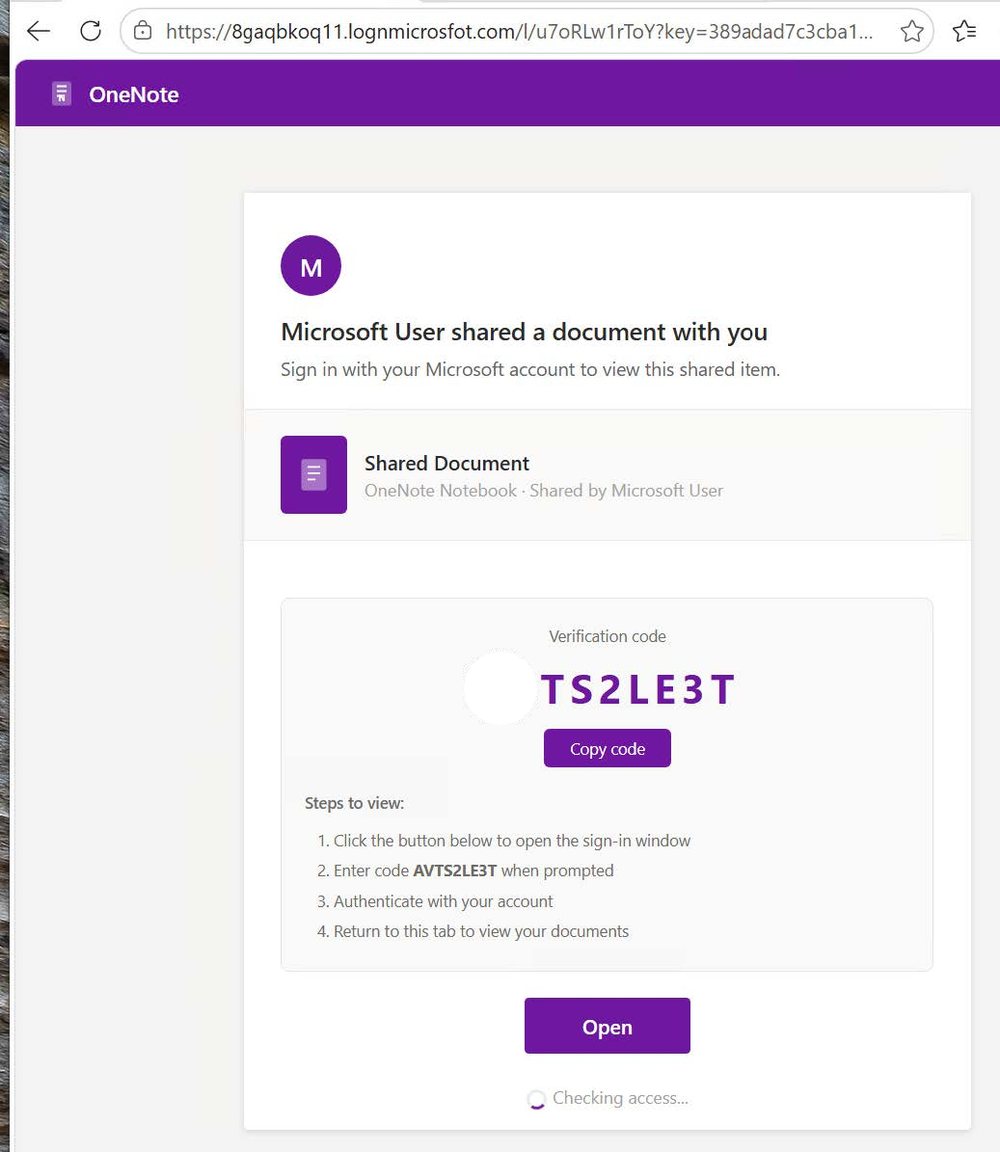
Next came a page claiming “Microsoft User shared a document with you.” It displayed a verification code, TS2LE3T, with a Copy button and step-by-step instructions: click Open, enter the code, sign in, then come back.
Red flags
- The email promised a OneDrive file. This page says OneNote notebook. The story keeps changing.
- The sender is just “Microsoft User”, not a real person you know.
- Still on the look-alike address lognmicrosofot.com.
- No real document ever asks you to copy a code into a sign-in page to view it. This is the moment the attack depends on.
Microsoft's real sign-in page
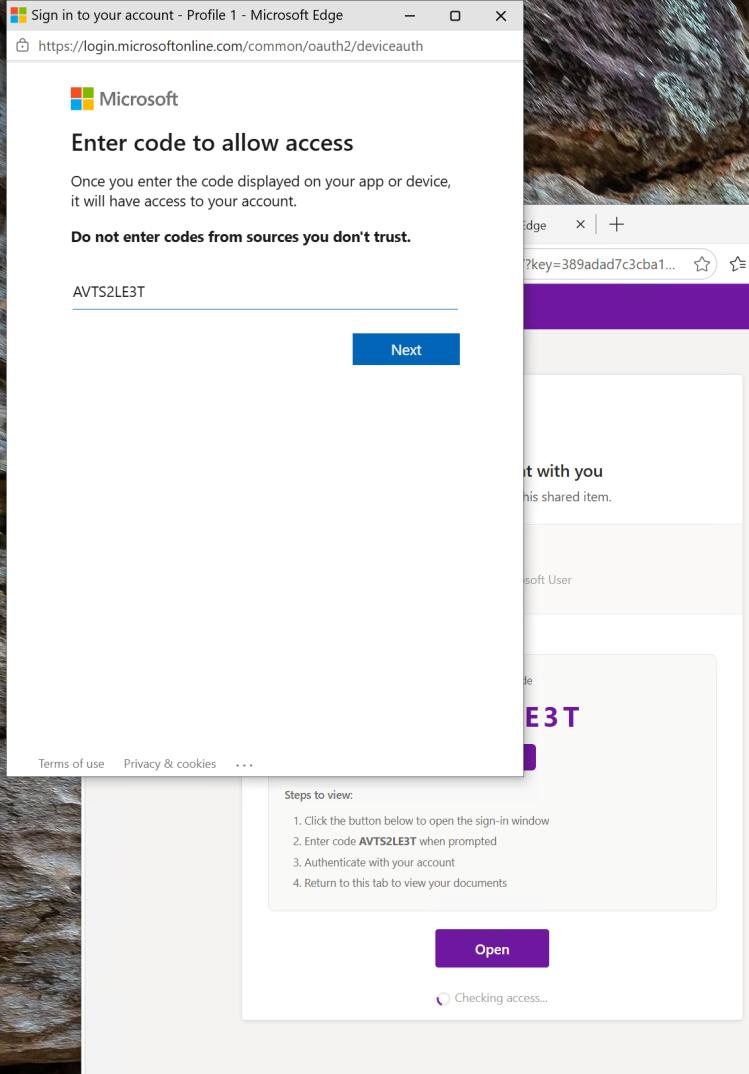
Clicking Open popped up a genuine Microsoft page at login.microsoftonline.com/
Red flags
- Microsoft's own page warns in bold: “Do not enter codes from sources you don't trust.” A code handed to you by an email or website is exactly that.
- This page being real is the trick. The address bar looks safe, so people trust it. Entering the code and signing in, including approving MFA, connects the attacker's device to your account.
Why this attack is dangerous
The attacker never needs your password or your MFA code. You do the sign-in, on Microsoft's real page, and Microsoft hands the resulting access to whatever device created the code: the attacker's.
- Attacker Attacker makes a code Shown to you on the fake page.
- You You enter the code On the real Microsoft page.
- You You sign in and approve MFA Everything looks normal.
- Microsoft Microsoft issues access To the attacker's device.
- Attacker Attacker stays signed in A password reset won't stop it.
That access comes as sign-in tokens, not a password. Tokens can keep refreshing for weeks or months, so resetting your password alone does not kick the attacker out. IT has to revoke the account's active sessions to end it.
With that access, an attacker can:
- Read and send your email, and quietly set up rules that hide replies from you.
- Open your OneDrive, SharePoint and Teams files.
- Use your trusted account to phish coworkers, clients and partners.
Red flags to remember
Any one of these is reason enough to stop and call us.
What to do
If you receive something like this
- Do not open the attachment, click the link or enter any code.
- Use the Report button in Outlook, or forward the email to systech, so we can block it for everyone.
- Delete the email.
If you already entered a code or signed in
- Call systech right away. Do not wait, and do not be embarrassed. Speed matters more than anything.
- Tell us roughly when you entered the code.
- We will revoke every active session on your account, reset your password, re-check your MFA methods and review your mailbox for forwarding rules or messages sent in your name. A password change on its own is not enough.
When in doubt, ask.
A two-minute call to the systech helpdesk costs nothing; a compromised account can cost weeks.
Indicators from this attack
For reference and for IT staff reviewing similar messages.
| Item | Value |
|---|---|
| Email lure | “You have received a confidential document” with OneDrive branding and a PIN-protected PDF |
| Phishing domain | 8gaqbkoq11.lognmicrosofot.com (look-alike of Microsoft) |
| Phishing path | /l/u7oRLw1rToY |
| Fake pages | “Security Verification” I am human check, then OneNote “Shared Document” page |
| Device code shown | AVTS2LE3T |
| Abused legitimate page | login.microsoftonline.com/ |
Further reading: Microsoft Threat Intelligence documented this technique in Storm-2372 conducts device code phishing campaign. For administrators, Microsoft Learn covers restricting device code sign-in with Conditional Access authentication flows.