
Greg Ekborg
Marketing Director, systech
Windows 10 Extended Security Updates: What October 13 Actually Costs
IT planning · Southwest Oregon
The computer still turns on. That is what makes October 13 dangerous.
Windows 10 machines did not stop working when support ended, and they will not stop working this October either. The cost of keeping them safe is what changes, and it changes in a direction that punishes waiting.
systech · Roseburg and Coos Bay, Oregon · August 2026
Every deadline that actually hurts a small business looks harmless on the day it arrives.
Nothing smoked. Nothing crashed. The PCs in the back office booted up on the morning of October 15, 2025, opened Outlook, printed invoices, ran Teams, and synced files, exactly as they had the day before. Which is precisely why so many businesses concluded there was nothing to do.
Windows 10 reached end of standard support on October 14, 2025. Microsoft stopped issuing free security fixes for it that day. The machines kept running, and the risk moved quietly from the screen into places you only look at when someone asks: procurement questionnaires, cyber insurance renewals, compliance checklists, vulnerability reports.
Now a second date is coming, and this one has a dollar figure attached.
What actually happens on October 13, 2026
Businesses that wanted to keep patching Windows 10 after support ended could buy into the Extended Security Updates program, which delivers critical and important security fixes on an annual subscription. That first year of coverage ends on October 13, 2026.
The program continues past that date. What changes is the price, and the pricing is deliberately structured to make waiting the worst option.
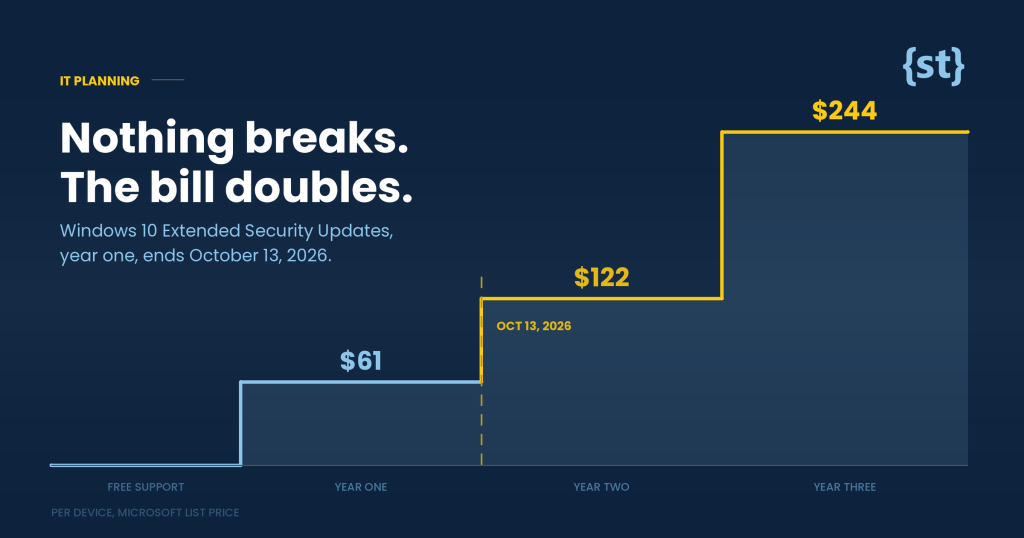
Extended Security Updates, per device
Microsoft's business pricing ladder. The figure doubles at each renewal.
Across all three years, keeping one Windows 10 machine patched costs roughly $427. Multiply that by the number of aging PCs in your office and compare it honestly against replacement.
For a ten person office still on Windows 10, year two alone runs about $1,220. That is not catastrophic, but it buys you nothing except more time on an operating system you will have to leave anyway. It is rent, not equity.
The detail that catches people
Skipping year one does not save the money
Extended Security Updates are cumulative. A business that skipped year one and enrolls in year two does not simply pay the year two price. It owes year one retroactively as well, which puts the minimum entry cost at roughly $183 per device rather than $122.
There is no version of this where waiting is cheaper. Waiting only decides whether you pay for coverage you received or coverage you did not.
The free extension you may have read about is not yours
In June 2026, Microsoft quietly extended its free consumer Extended Security Updates program through October 12, 2027. That change was reported widely, and it has caused a specific and expensive confusion.
That extension applies to personal home devices. It is not the business program. A company running Windows 10 Pro on office machines under the commercial ESU program is on the ladder above, not the free consumer track.
If you read a headline this summer suggesting Windows 10 got another free year and quietly took your business off the to-do list, this is the paragraph worth rereading. Mixing up the consumer and commercial programs is the single most common way an office ends up unpatched this autumn.
One genuine exception: Windows 10 Enterprise LTSC 2021 has its own, much longer support life, running to January 2032. If you are on that edition you are in a different position entirely, and it is worth confirming which edition you actually have rather than assuming.
The deadline nobody is talking about
There is a second clock running alongside the licensing one, and it is more technical but harder to negotiate with.
Beginning in June 2026, the Secure Boot certificates Microsoft issued back in 2011 started reaching expiry. Secure Boot is the mechanism that verifies your machine is loading a legitimate operating system when you power it on. Devices that are not receiving updates cannot receive the replacement certificates.
This is a cryptographic expiry, not a policy choice, which means it does not care about your upgrade timeline. It is one more reason that an unpatched Windows 10 machine in 2027 is a different kind of problem than an unpatched machine was in 2020.
Sources: Microsoft Learn on the Extended Security Updates program, and Microsoft's Windows release health documentation on Secure Boot certificate expiration. Pricing is per device and subject to change. Confirm current figures before budgeting.
How to decide what to do with each machine
This is not one decision. It is a decision per machine, and most offices find their fleet splits cleanly into three groups.
It can run Windows 11 and it is under about five years old
Upgrade it. The in-place upgrade is free for machines that meet the hardware requirements, and doing it now on your own schedule is far easier than doing it in a hurry. This is usually the largest group and the easiest win.
It cannot run Windows 11, but it is doing real work
Replace it, and pick the quarter. Spread across two or three quarters, new machines are a budget line. Bought all at once after a failure, they are an emergency purchase at whatever price and lead time the market offers that week.
It cannot run Windows 11 and it runs one specific old thing
This is the machine attached to a piece of equipment, a legacy database, or software the vendor stopped updating. Extended Security Updates exist for exactly this case. Buy the coverage, isolate the machine on the network, and start the conversation with that vendor now, because that conversation is usually slower than the hardware one.
A four step plan you can start this week
- Count the machines. Not a guess, an actual list. Most offices are surprised in one direction or the other, and you cannot budget for a number you do not have.
- Sort them into the three groups above. Which can take Windows 11, which cannot, and which are chained to something old. The answer determines the cost, not the calendar.
- Upgrade the easy ones now. Free, low risk, and it shrinks every number that follows.
- Put the rest on a replacement schedule with dates on it. Named quarters, not "sometime this year." A plan with dates survives a busy month. A plan without them does not.
None of this is urgent in the way a security incident is urgent. That is exactly the problem. October 13 is not the day Windows 10 computers stop working. It is the day keeping them safe gets more expensive, and the day the businesses that planned ahead start looking noticeably smarter than the ones that did not.
Not sure what you are actually running?
Most businesses do not have a current list of which machines can take Windows 11 and which cannot. We will put one together with you, tell you plainly what it would cost to do nothing, and what a phased plan would cost instead. If the honest answer is that you are already in good shape, we will say so.
Prefer to talk it through? Email support@systech.io or call 541.696.5555, Option 1.